
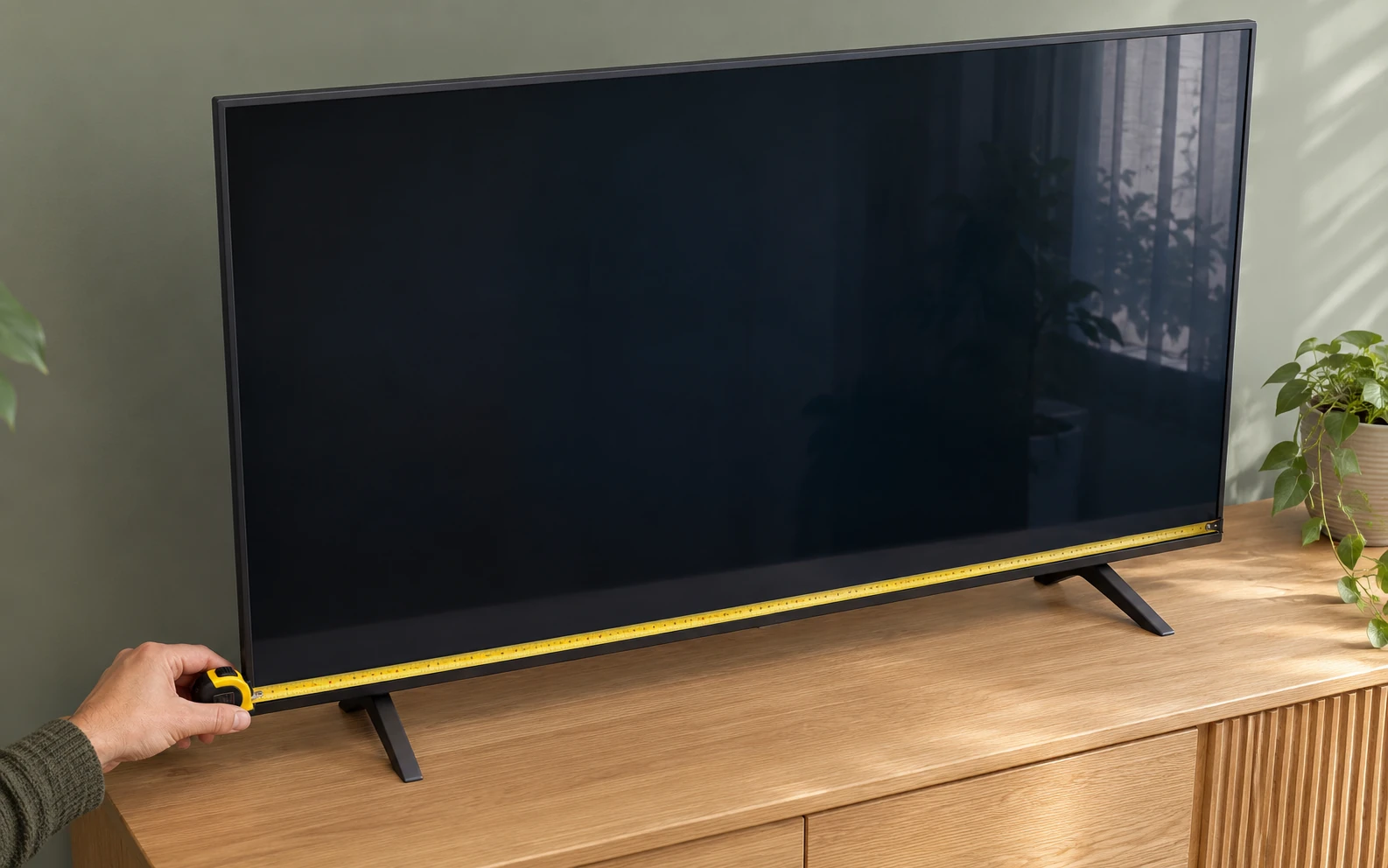
Use the measurement that answers your question.
- What screen size is this?
- Measure the image area diagonally. Exclude the frame and record the actual measurement rather than rounding immediately.
- Will it fit on this furniture?
- Use overall dimensions with the stand, foot placement and required clearances. The advertised diagonal is insufficient.
- Will my wall mount fit?
- Check the documented VESA hole spacing, TV weight without stand, screw requirements and mount compatibility.
Make a useful measurement record.
Find the model number first
The manufacturer's specification sheet may already provide accurate dimensions. Match the complete model and screen size, including the US suffix where relevant. TVs from the same series can use different stands and mounting patterns in different sizes. Samsung's US TV size guide points shoppers to the full set dimensions in a model's specifications. Save the model suffix and a copy of the spec page with your measurements, because a similarly named model in another region may have a different stand.
Measure the visible diagonal
Use a tape measure from one corner of the visible display to the opposite corner. Keep the metal end and tape away from the delicate screen surface. Do not include the bezel. For a large installed TV, use the specification sheet rather than leaning on the panel or lifting it alone. Keep the tape straight across the visible image, not around a curved route over the surface. If you do not want a metal tape near the panel, use the official specification instead. Record the measured number with its unit and compare it with the manufacturer's actual screen diagonal; marketing size classes are often rounded.
Record the outside dimensions
Measure the cabinet's full width and height, then its deepest point. If using the supplied stand, include its added height and front-to-back depth. Record whether each dimension includes the stand so the figures remain meaningful when comparing another TV. The Sony K-55A60C specification page shows separate with-stand and without-stand dimensions and weight, illustrating why the two configurations must not be mixed. Note the widest point, including any protruding feet, rather than only the width of the glass.
Check the feet and cable space
Measure the footprint of the feet or pedestal, including their depth. Some models offer alternate foot positions, but use only documented configurations. Leave the ventilation and connector space required by the manual, including room for a cable to bend naturally. A cable connector can need more rear space than the bare chassis depth suggests. Check whether ports face sideways or backward and avoid a tight bend that strains the plug. If the model has alternate foot positions, confirm that the selected position is documented and that the stand parts supplied with the TV support it.
Measure the destination
Record the furniture top or cabinet opening, any shelf above the TV and the path into the room. Check the furniture's load rating separately. For a wall mount, use its template and the TV's mounting diagram rather than treating the screen center as a drilling location. LG's installation checklist prompts buyers to check the route through the home as well as the final position. Measure the narrowest doorway and turning space before ordering a larger set. For a wall installation, record wall construction and the mount's own load and fastening requirements; a tape measure alone cannot certify the wall.
Find the symptom. Check the cause.
The diagonal does not match the box exactly
A size class can be rounded. A nominal 40-inch or 65-inch television may have a slightly smaller measured diagonal. Match the manufacturer's actual viewing-area specification before assuming the product was mislabeled. For example, a television sold in a 55-inch class can have a measured diagonal slightly below 55 inches. This is a labeling convention, not a change to its cabinet measurements. Use the exact manufacturer specification when a tight fit matters.
The screen fits but the feet do not
Screen width and stand footprint are different constraints. Recheck the with-stand dimensions and any approved narrow stand position. Do not leave the feet overhanging or invent a mounting arrangement to fit an undersized surface. Do not balance the TV on feet that hang beyond the furniture. Compare the stand's outside width and front-to-back depth with the usable top surface, not with the furniture's total width if a raised lip or decorative edge reduces the flat area.
Two same-size TVs have different outer dimensions
Bezels, chassis thickness and stand designs vary. Compare complete model specifications. A calculated 16:9 screen rectangle estimates only the image area, not the physical cabinet or the space needed behind it. Frame thickness, speaker layout and stand design all change the total footprint. Check the full width and height for each candidate, plus the depth of the stand or wall bracket. The 16:9 calculation is useful for understanding the image, not for guaranteeing a fit.
Useful conversions and a worked example.
One inch equals 2.54 centimeters. Divide a centimeter measurement by 2.54 to convert it to inches. Keep your original measurement and units in the notes so rounding does not hide a tight clearance.
For a mathematically exact 55-inch 16:9 image, the visible rectangle is about 47.9 inches wide and 27.0 inches high. Those are calculated screen dimensions, not the dimensions of a specific 55-inch TV. See the screen-size reference table for more examples, or use the room-size guide to choose a suitable diagonal.
For a wall mount, identify the horizontal and vertical hole spacing in millimeters and compare it with the mount manual. VESA describes its Flat Display Mounting Interface standard, but a matching hole pattern is only one compatibility check. Confirm the TV weight, screw type and length, wall material and any model-specific bracket instructions before installation.
Keep a simple record: screen diagonal; cabinet width, height and depth without stand; with-stand dimensions; distance between outer foot edges; TV weight; VESA pattern; and clearance or cable notes. Add the source and model number beside each figure. This makes it easy to compare a replacement without relying on memory or a rounded size label.
Model-aware instructions.
This guide draws on manufacturer and standards sources reviewed for the November 18, 2026 editorial update. We distinguish common steps from model-specific requirements and link relevant official guidance in the FAQs.
Menu names, app interfaces and supported features can change. Use the manual for your exact model when it differs from a general procedure. This is researched guidance, not a claim that we tested every television, app or accessory described.
A little more clarity.
Are TV sizes measured diagonally or across?
The advertised screen size describes the diagonal of the visible image, from one corner to the opposite corner. It is not the cabinet width. For furniture or a recess, you also need the manufacturer's overall dimensions and clearance requirements. Mark the end points at the corners of the active picture area. Do not run the tape along the top edge and call that the size. If the television is mounted high or difficult to reach, consult the model specification rather than climbing or pressing on the display.
Does the bezel count in the screen measurement?
No. Measure the visible display area when checking the screen diagonal. Include the bezel when measuring the overall width and height for fit. Keep those two measurements labeled separately to avoid comparing an image-area figure with a cabinet dimension. The frame still matters for furniture, wall recesses and neighboring speakers. If you are replacing a set, measure the old cabinet and compare it with the new model's published overall dimensions instead of assuming two sets with the same diagonal will occupy the same space.
How wide is a 55-inch TV?
An exact 55-inch 16:9 image is approximately 47.9 inches wide, calculated from its aspect ratio. The complete television is wider because it includes a frame. Use the exact model's specification sheet before ordering furniture or marking a wall. Feet can extend beyond the cabinet in either direction and add substantial depth. Check the with-stand dimensions and foot spacing for the exact model, especially if the console has a narrow top or a raised edge.
How do I convert centimeters to inches?
Divide centimeters by 2.54. For example, 139.7 centimeters equals 55 inches. Be clear about whether you measured the screen diagonal or cabinet width, because converting the units does not change what the original measurement describes. Keep enough precision to make a fit decision. Rounding a conversion to the nearest inch can conceal a small but important difference in a cabinet opening. Use the same unit throughout your notes where possible.
What is VESA spacing?
It is the horizontal and vertical spacing between compatible mounting holes, usually stated in millimeters. It does not specify the TV's weight or the correct screw length. Those details and the wall construction must also match the mount's instructions. The pattern is usually recorded as width by height, such as 300 by 200 millimeters. Check the complete mounting instructions for the television and bracket before choosing hardware; the hole pattern alone does not establish wall suitability.
Can I rely on the advertised size when replacing a TV in a cabinet?
No. Compare the full dimensions, stand footprint and required ventilation gap. Samsung's measurement and size guide distinguishes the screen from its surrounding structure. The replacement model's own dimensions remain the final check.
 See screen dimensions
 Choose a size for your room
 Plan mounting height